AI Clipboard Shortcuts
for Windows. Any App.
Copy text, press a hotkey, and get an AI-transformed result back on your clipboard without leaving your app.
Windows 10/11 · No Python required · 27MB installer
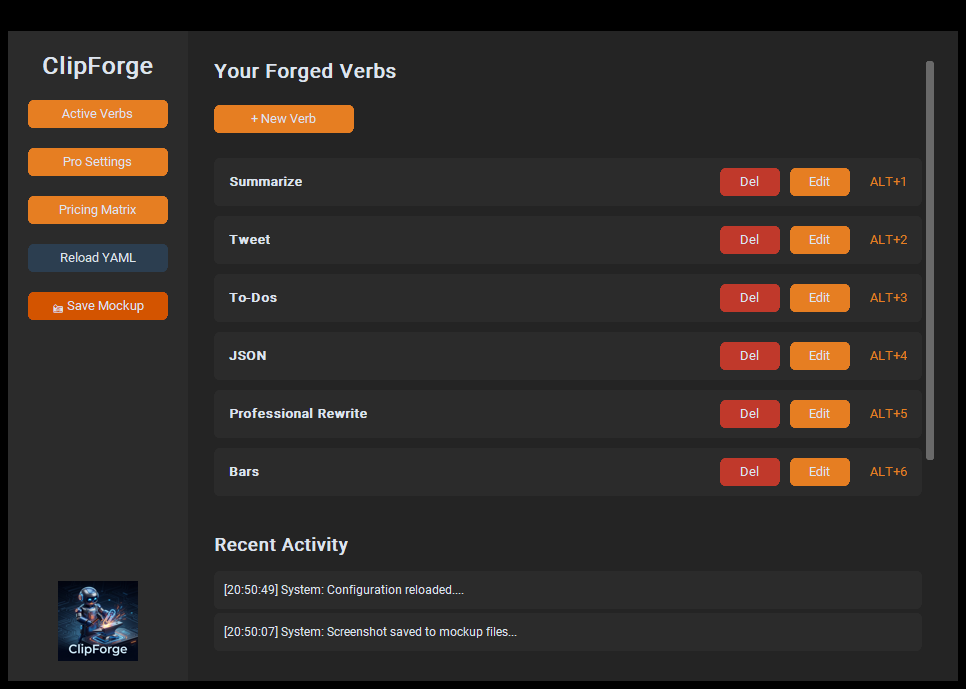
Hotkey Transformations
Run a saved AI prompt on copied text with a configured shortcut such as Alt+1 or Ctrl+Shift+X.
Custom AI Verbs
Build and name your own transformations — summarize, rewrite, translate, extract, format. Your prompts, your hotkeys, stored locally.
Universal AI
Bring your own provider. Connect to cloud AI services or configure a local Ollama or LM Studio endpoint.
Know Where Your Text Goes
Choose Your AI Provider
ClipForge sends clipboard text to the AI endpoint you configure. Cloud providers receive that text under their own terms; a local endpoint can keep processing on your device or network.
Local Provider Support
Pro users can configure Ollama or LM Studio. Data routing depends on the endpoint you set and how that endpoint is hosted.
Open Standards
Your "Verbs" are stored in simple YAML files on your machine. You own your prompts, your history, and your configuration.
The Core Purpose
The OS Intention Layer
ClipForge is not just another wrapper for ChatGPT. It is a Native OS Engine engineered to sit between your clipboard and your most repetitive tasks. It serves as the "Intention Layer" of your operating system—allowing you to transform data, clean code, and draft content through global hotkeys.
What it can do
Infinite Transformations
If you can copy it, you can forge it. ClipForge specializes in High-Performance Workflows:
- Code Smithing: Clean up JSON, refactor Python, or document functions.
- Content Forging: Turn rough notes into X threads, LinkedIn posts, or professional emails.
- Data Refining: Summarize legal PDFs, translate chats, or extract action items from meetings.
Who it is for
The Elite Knowledge Worker
ClipForge is built for the Founders, Developers, and Researchers who live in the trenches of information. It is for the person who performs 50+ transformations a day and is tired of the "Copy-Tab-Paste" fatigue. If your time is worth more than the friction of context-switching, this is your anvil.
The Why
Protecting the "Flow State"
Every time you switch to a browser to use AI, you kill your focus. Context-switching is cognitive debt. ClipForge is designed to keep you in your IDE, your doc, or your terminal. With BYOM (Bring Your Own Model) Support, you can configure a cloud provider or a local model endpoint. Clipboard text is sent to the endpoint you choose; review its hosting and data terms before sending sensitive content.
Hardened in the Foundry
✅ Hotkey-driven workflow
✅ Windows desktop app
✅ Local LLM support (Pro)
✅ Configurable AI providers
Windows Installer Status
ClipForge is a Windows-native engine designed specifically for high-performance desktop workflows. It is not a mobile app.
The current installer is unsigned and may trigger a Windows SmartScreen warning. Windows has not verified its publisher. Only download from the official ClipForge site, and do not proceed if you cannot confirm the file's source or are unsure about the warning.